

ITSM Multiple Project Status Report Excel Template







Are you 18 years old or older?
Sorry, the content of this store can't be seen by a younger audience. Come back when you're older.
Managing several IT service management projects at the same time requires a clear view of progress, timelines, budgets, resources, and potential risks. The ITSM Multiple Project Status Report Excel Template helps you monitor multiple initiatives in one consolidated portfolio report. Use this editable Excel template to track ITSM implementations, service improvement projects, IT operations initiatives, and service management process enhancements. Review portfolio delivery timelines, project health, financial performance, and individual project updates in one place. The template supports tracking up to five projects, with the flexibility to add more as your portfolio grows.

An ITSM Multiple Project Status Report is a portfolio-level reporting tool used to monitor the progress and health of several IT service management projects.
IT departments often manage multiple initiatives simultaneously, such as implementing an ITSM platform, improving incident management, introducing change management processes, upgrading service desk capabilities, and enhancing IT operations.
Tracking each initiative separately can make it difficult to understand the overall portfolio position. A consolidated status report brings important project information together, helping IT managers and stakeholders review delivery timelines, budgets, resources, risks, and progress.
Managing several ITSM projects requires regular monitoring and consistent reporting. A structured portfolio report helps managers identify delays, review financial performance, and understand which initiatives need attention. Use this template to:
Monitor multiple ITSM projects: Track up to five projects in one consolidated report, with the option to add more.
Review portfolio health: Assess project status across schedule, budget, resources, and risks.
Track delivery timelines: View planned project dates and delivery phases through a portfolio roadmap.
Monitor project finances: Compare planned, actual, and forecast costs across ITSM initiatives.
Review individual project progress: Track project phases, dates, completion percentages, and status updates.
Identify risks and dependencies: Record concerns and issues that may affect project delivery.
Improve stakeholder communication: Present a clear portfolio overview during IT management and project review meetings.
The template brings together four important reporting areas to help you monitor your ITSM project portfolio.
Use the portfolio delivery roadmap to visualize the planned timelines and completion phases of different ITSM projects. Enter the delivery dates for each initiative and use the colour indicators to communicate project progress:
Green – On Track: The project is progressing according to plan.
Amber – At Risk: The project needs attention due to potential delays or concerns.
Red – Off Track: The project is not progressing according to its planned schedule.
You can use the roadmap to monitor initiatives such as:
ITSM platform implementation
Incident management improvement
Service desk transformation
Change management implementation
IT service reporting improvements
IT operations enhancement projects
Get a consolidated view of the overall health of your ITSM project portfolio. The portfolio status section allows you to review four key indicators for each project:
Schedule: Review whether project activities are progressing according to planned timelines.
Budget: Monitor the financial position of each initiative.
Resources: Review resource-related status and concerns.
Risks: Highlight risks that may affect project delivery.
Use the Green, Amber, and Red status indicators to communicate whether each area is on track, at risk, or off track. This makes it easier to identify projects that require further review or management attention.
Monitor the financial position of your ITSM projects using the portfolio financials section. Enter the planned costs, actual costs, and forecast costs for each initiative. The template calculates the difference between planned and actual expenditure and displays portfolio budget information and variances. This section can support financial reviews for projects such as:
ITSM software implementation
Service desk improvement programmes
IT infrastructure upgrades
ITIL process improvement initiatives
IT operations projects
Service management transformation
Use the financial information to review project spending and discuss budget performance with stakeholders.
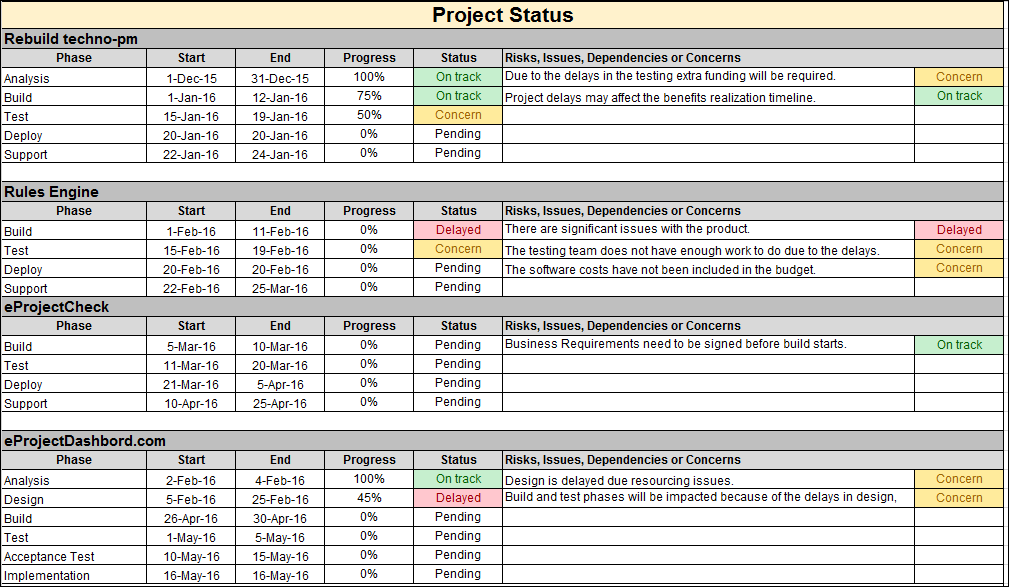
Review each project separately to understand its current progress and delivery position. The individual project status section allows you to record:
Project name
Current project phase
Start date
End date
Percentage of completion
Current phase status
Risks and issues
Dependencies and concerns
The template includes status options to communicate the position of each project phase:
On Track: Activities are progressing as planned.
Delayed: The phase is behind its planned schedule.
Concern: An issue or potential problem requires attention.
Pending: The activity is awaiting progress or action.
Use this section to provide more detailed updates on individual ITSM initiatives while maintaining an overall portfolio view.
Follow these steps to prepare and maintain your ITSM project portfolio report.
Set up your project portfolio: Add the ITSM projects you want to monitor, such as service desk implementation, incident management improvements, or IT operations initiatives.
Update the delivery roadmap: Enter the planned delivery dates for each project and use the colour indicators to show its status.
Review portfolio health: Assess schedule, budget, resources, and risks for every project. Assign the appropriate Green, Amber, or Red status.
Enter financial information: Add planned, actual, and forecast costs for each project. Review the calculated differences and portfolio budget variances.
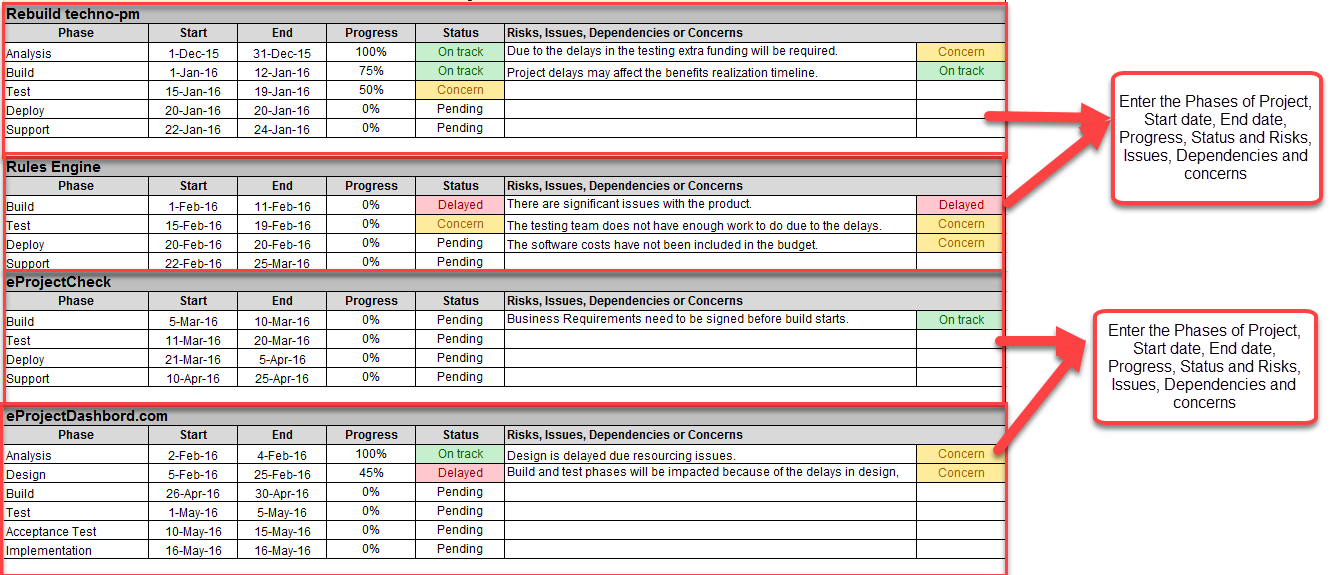
Complete individual project updates: Enter each project's name, current phase, start and end dates, and percentage of completion.
Update phase status: Select On Track, Delayed, Concern, or Pending to communicate the current position of each project phase.
Record risks and dependencies: Document project risks, issues, dependencies, and concerns that may affect delivery.
Review the portfolio: Compare project progress, timelines, budgets, and overall status to identify areas requiring attention.
Share the report: Use the consolidated view during IT management meetings, project reviews, and stakeholder discussions.
Update the report regularly to maintain an accurate view of your ITSM portfolio.
This template is suitable for professionals responsible for managing and reporting on multiple IT service management initiatives.
IT Directors: Review the overall status of IT projects and service management investments.
IT Service Managers: Monitor service improvement initiatives and ITSM implementation progress.
ITSM Project Managers: Track project timelines, budgets, resources, risks, and delivery status.
IT Operations Managers: Review progress across operational improvement and technology projects.
PMO Managers: Consolidate project information and support portfolio-level reporting.
Service Delivery Managers: Monitor initiatives that support service delivery improvements.
IT Consultants: Present project portfolio updates and implementation progress to clients.
Use this template whenever you need to monitor several ITSM projects and communicate their progress in a consolidated format. Typical use cases include:
ITSM implementation portfolio reviews
ITIL process improvement programmes
Service desk transformation projects
Incident and problem management improvements
Change and release management initiatives
IT operations improvement projects
IT infrastructure and technology upgrades
Service management tool implementation
Monthly IT project portfolio reviews
Management and stakeholder reporting
A consistent reporting approach helps IT teams maintain visibility across multiple initiatives and communicate project performance more effectively.
Consolidated project visibility: Review multiple ITSM projects in one report.
Better delivery monitoring: Track planned timelines and identify projects that may be delayed.
Financial oversight: Compare planned, actual, and forecast project costs.
Clearer project health: Review schedule, budget, resources, and risks using colour-coded indicators.
Improved risk awareness: Highlight issues, dependencies, and concerns across the portfolio.
Consistent project updates: Use a common reporting structure for all initiatives.
Informed management discussions: Give stakeholders a clearer view of portfolio progress and areas requiring attention.
The ITSM Multiple Project Status Report Excel Template provides a practical way to monitor and report on multiple service management initiatives. With sections for portfolio delivery roadmaps, project health, financial performance, and individual project updates, it helps IT managers maintain a consolidated view of their project portfolio. Customize the editable Excel template to reflect your organization's ITSM projects, reporting requirements, and portfolio priorities. Use it for regular project reviews, financial monitoring, and stakeholder communication.