

ITSM Project Timeline Template






Are you 18 years old or older?
Sorry, the content of this store can't be seen by a younger audience. Come back when you're older.
Plan, schedule, and monitor your IT service management projects with an editable Excel Project Timeline Template. Designed for IT project managers, ITSM teams, and consultants, this template helps you organize project tasks, set start and end dates, track milestones, and communicate timelines clearly to stakeholders. ITSM projects often involve several teams, activities, and dependencies. Implementing a service management tool, improving incident management, updating change enablement processes, or introducing new ITIL practices requires coordinated planning. Without a clear timeline, tasks can overlap, deadlines can be missed, and stakeholders may struggle to understand what needs to happen next. This ITSM Project Timeline Template provides a visual way to organize planned activities and review schedules. Use it for individual ITSM projects, multiple initiatives, or customized planning requirements. Adapt the timeline to your project scope, implementation approach, and delivery milestones.

An ITSM Project Timeline Template is a visual planning tool that arranges project activities in chronological order. It helps teams understand when tasks should begin and finish, how work is distributed over time, and which milestones are important for successful delivery.
For example, an ITSM tool implementation may include requirements gathering, process design, system configuration, testing, staff training, and deployment. A timeline helps organize these activities into a sequence that the project team can review and communicate.
The template can also support ongoing service improvement projects, ITIL practice implementation, service desk transformation, and internal IT initiatives.
The Excel workbook includes three timeline options, allowing you to choose a format that suits your planning needs.
Use the single-project timeline to plan the activities of one ITSM initiative in greater detail.
The template allows you to list tasks and record key information such as task names, start dates, end dates, and effort. A configuration sheet lets you adjust the timeline start date and scale to suit your project schedule.
This view is useful when planning a defined implementation or improvement project, such as introducing a new service request process or upgrading an ITSM platform.
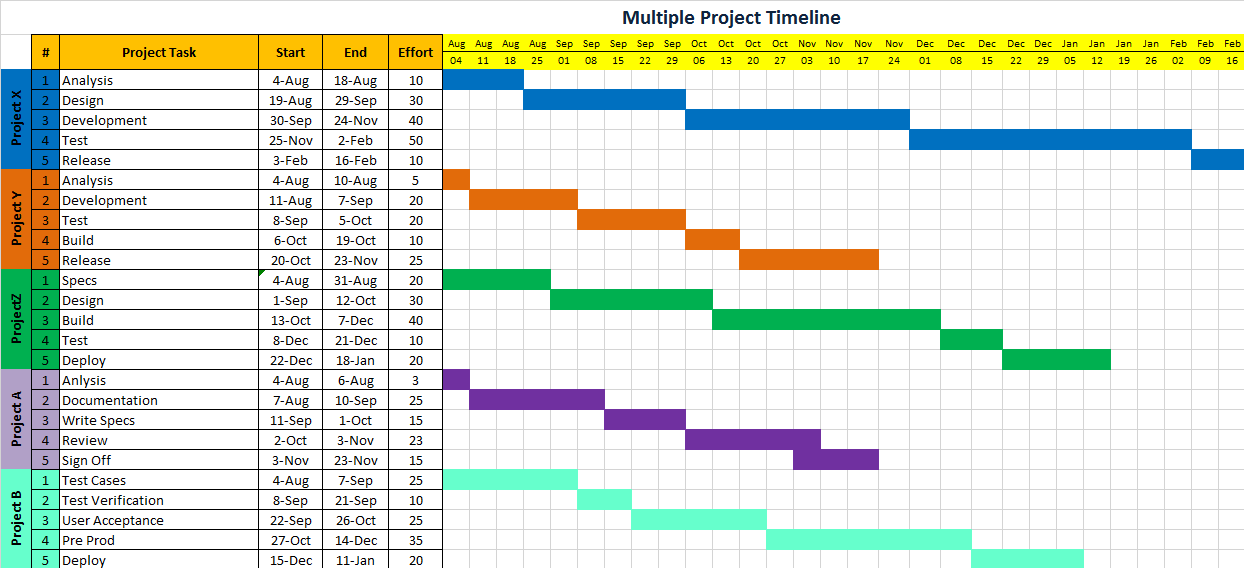
Use the multi-project timeline to maintain a high-level view of several initiatives in one place.
The template supports up to five projects, with space for up to five tasks per project. Colour-coded displays help distinguish projects and make it easier to review their planned activities together.
For example, an ITSM manager could use this view to compare timelines for a service desk improvement initiative, a change enablement project, a knowledge management rollout, and an ITSM tool upgrade.
This view is intended for high-level coordination rather than detailed tracking of a large project portfolio.
The manual timeline provides a flexible format for projects with specific scheduling or presentation requirements.
Using basic spreadsheet cell formatting and formulas, you can customize the timeline structure and add rows as needed to represent tasks, phases, or milestones.
This option is helpful when a standard timeline layout does not match your project structure or when you need to create a simplified schedule for a particular workstream.
1. Customizable Timeline Settings: Adjust the timeline start date and scale to reflect your project's planned duration. This helps you create a schedule that matches the timeframe of your ITSM implementation or service improvement initiative.
2. Task Start and End Dates: Record planned start and finish dates for project activities. Clear dates help team members understand when work is expected to begin and when deliverables should be completed.
3. Effort Information: Use the available effort field to document the effort associated with tasks where applicable. This can support planning discussions and help teams consider the work required for different activities.
4. Visual Project Scheduling: View project activities along a timeline to understand their sequence and duration. A visual schedule can make it easier to communicate the overall plan than a simple list of tasks.
5. Multi-Project Overview: Use the multi-project option to display activities across up to five projects. This can help managers review competing schedules and identify areas that may need further coordination.
6. Flexible Manual Editing: Adapt the manual timeline to fit your project requirements. Add rows and customize the layout for specific tasks, phases, milestones, or reporting needs.
7. Stakeholder-Friendly Reporting: Use the timeline as a reference during project meetings and stakeholder updates. A clear schedule helps communicate upcoming activities, important dates, and planned deliverables.
1. Improve Project Visibility: Maintain a clear view of planned activities and milestones. Team members and stakeholders can use the timeline to understand the sequence of work and the expected timeframe for delivery.
2. Coordinate Implementation Activities: ITSM projects often require input from process owners, technical specialists, service desk teams, and business stakeholders. A shared timeline helps coordinate these activities and provides a common planning reference.
3. Identify Scheduling Conflicts: Review tasks across the project timeline to spot possible overlaps and areas that may require further coordination. Where activities depend on earlier work, review the schedule carefully to ensure the sequence is realistic.
4. Communicate Milestones Clearly: Use the timeline to highlight key dates and planned deliverables. This can help stakeholders understand project progress and prepare for upcoming decisions or implementation activities.
5. Support Multiple Initiatives: The multi-project timeline provides a high-level view of up to five projects. This can help ITSM managers coordinate smaller initiatives and review how their schedules fit together.
6. Adapt Planning to Different Project Needs: Choose between single-project, multi-project, and manual timeline formats according to your requirements. This flexibility allows you to use the workbook for different types of ITSM planning activities.
1. ITSM Tool Implementation: Plan activities for implementing or upgrading an IT service management platform. These may include requirements gathering, workflow design, configuration, testing, training, and rollout. Organize the work into a logical sequence and communicate key milestones to the teams involved.
2. Incident Management Improvement: Create a timeline for reviewing incident management processes, updating procedures, refining escalation arrangements, and preparing service desk employees for changes.
3. Change Enablement Implementation: Schedule activities related to reviewing change workflows, defining roles, documenting procedures, configuring supporting tools, and preparing stakeholders for implementation.
4. Service Request Management: Organize the activities required to improve service request workflows, define request fulfilment steps, update service documentation, and communicate process changes.
5. Knowledge Management Rollout: Plan knowledge management activities such as reviewing existing knowledge resources, creating or updating articles, establishing review responsibilities, and preparing teams to use the updated knowledge base.
6. ITIL Practice Implementation: Create a timeline for introducing or improving ITIL-aligned practices. Depending on the project scope, this may include assessment, process design, documentation, training, implementation, and review.
7. Service Desk Transformation: Coordinate activities associated with service desk restructuring, workflow improvements, staff training, technology changes, and updated operational procedures.
8. IT Operations Improvement: Use the timeline to plan infrastructure-related initiatives, monitoring improvements, application upgrades, or operational process changes that require defined activities and target dates.
The ITSM Project Timeline Template can support professionals involved in IT project planning and service management improvement.
IT Project Managers: Plan activities, set dates, and communicate project milestones.
ITSM Managers: Coordinate implementation activities and service improvement initiatives.
ITIL Consultants: Organize client implementation timelines and communicate planned deliverables.
Service Desk Managers: Schedule workflow improvements, training, and operational changes.
Process Owners: Plan activities required to introduce or improve ITSM practices.
Service Delivery Managers: Coordinate project work that affects service delivery.
PMO Teams: Prepare high-level timelines for suitable projects and initiatives.
IT Operations Managers: Plan internal IT projects and coordinate technical activities.
Choose the single-project timeline for a detailed schedule, the multi-project timeline for a high-level view of several initiatives, or the manual timeline for a customized layout.
List the activities required to complete your ITSM project. Break large deliverables into manageable tasks that can be scheduled and reviewed. For example, an ITSM implementation may include process assessment, requirements gathering, configuration, testing, training, and deployment.
Record task names and the relevant start dates, end dates, and effort information using the available fields.
Use clear task descriptions so that team members and stakeholders can understand what each activity involves.
Adjust the start date and timeline scale to reflect your project timeframe. Choose a view that makes the schedule easy to read and appropriate for the duration of the project.
Check the order of activities, planned dates, and potential overlaps. Consider resource availability, approvals, and dependencies when reviewing whether the schedule is realistic.
Highlight important project dates and deliverables, such as completion of process documentation, testing approval, training completion, or implementation go-live.
Use the timeline during project meetings and stakeholder updates. Make sure relevant team members understand the planned schedule and their responsibilities.
Review the schedule regularly and update dates when changes are agreed. Communicate important revisions so that stakeholders continue to work from the same plan.
A clear project timeline helps IT teams organize work, communicate deadlines, and coordinate activities across implementation and service improvement initiatives. It gives project managers and stakeholders a shared view of what is planned, when tasks are expected to happen, and which milestones matter. The ITSM Project Timeline Template for Excel offers three flexible timeline options for single projects, multiple projects, and customized scheduling. Adapt the workbook to your ITSM requirements and use it as a practical reference throughout project planning and delivery.